
If your content isn't displaying the correct language, our Localization script might be detecting the wrong locale. Follow this guide to verify how the script identifies your language and how to fix it.
Phase 1: Verify the Detected Language
Before changing code, check what the script is actually sending to our servers.
Open your website in the browser.
Right-click anywhere and select Inspect (or press
F12) to open the Developer Tools.Navigate to the Network tab.
In the "Filter" or "Search" box, type
data.json.Refresh the page.
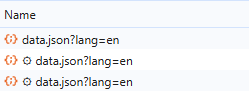
Look for a request that looks like
data.json?lang=xx. (see image below for reference)The value after
lang=is what our script has detected.
Phase 2: How Detection Works
Our script uses a multi-level fallback system to determine which language to display.
1. Primary Method: HTML lang Attribute
The script first looks at the root of your website's code. This is the most reliable way to ensure the correct language loads.
Technical Check: The script runs
document.documentElement.lang.Requirements:
Must be a 2-character code (e.g.,
en,de) or include a country suffix (e.g.,en-US,fr-FR).Validation: It must match the pattern
/^[a-zA-Z0-9-]+$/. If it contains special symbols or spaces, it will be ignored.
2. Secondary Method: Browser Language Fallback
If the lang attribute is missing from your HTML, the script defaults to the user's browser settings.
Technical Check: The script runs
navigator.language.Logic: It will always extract the first part of the code.
en-USbecomes encs-CZbecomes cs
Phase 3: Common Fixes
| Issue | Solution |
| Wrong language appearing | Check your <html> tag. Ensure it looks like <html lang="en">. If it is missing, the script is guessing based on your browser. |
| Language shows as "en" regardless of HTML | Ensure your lang attribute is valid. For example, <html lang="en_US"> (with an underscore) may fail validation; use <html lang="en-US"> instead. |
data.json shows no lang parameter | Ensure the script is properly embedded and that the <html> tag is not being modified by other third-party plugins after the page loads. |