
When managing how tours, surveys, or banners appear to your users, it is important to distinguish between recurring triggers, user-initiated snoozing, and fixed scheduling.
While all three involve timing, they control different aspects of the user experience.
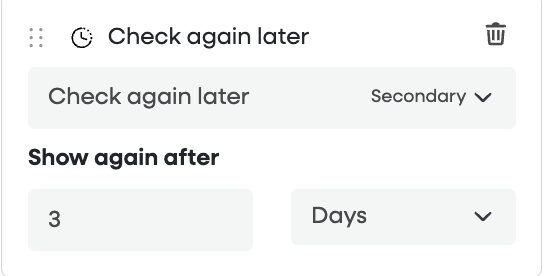
1. "Check again later" Button (The Snooze Logic)
The X days setting for the "Check again later" button acts like a snooze button for your end users. It allows a user to "skip for now" without dismissing the content permanently.
How it works: When a user clicks "Check again later," the system waits for the specified number of days before redisplaying that specific tour or survey to that user.
Best Use Case: Minimizing user frustration by letting them choose a more convenient time to engage with your content.
2. Content Triggering (The Recurrence Interval)
This setting is used to automatically display content at regular, repeating intervals. It ensures that users see a specific item periodically throughout their lifecycle.
How it works: The system tracks when a user last responded to or closed a survey. It then starts a countdown; once the specified "X days" (e.g., 90 days) is reached, the content is automatically triggered to reappear.
Best Use Case: Periodic data collection, such as sending an NPS (Net Promoter Score) survey every quarter.

3. Scheduling (The Publication Window)
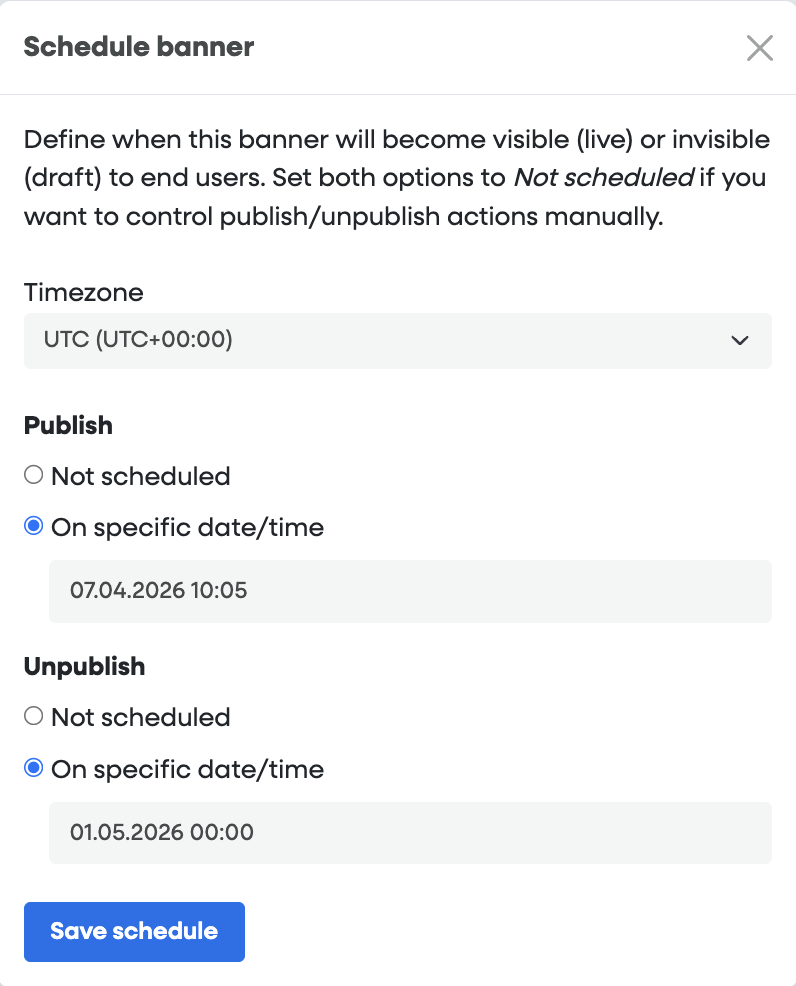
Scheduling is used to control the overall lifespan of your content. Unlike the settings above, which are based on individual user behavior, scheduling is based on fixed calendar dates.
How it works: You set a specific "Start Date" and "End Date" for the content to be live on your production environment.
Example: If a new feature launches on March 30th, you can prepare a Smart Tip or a Banner in advance. You set it to go live on March 30th and automatically unpublish (expire) after 30 days.
Best Use Case: Time-sensitive announcements, new feature launches, or seasonal promotions.
Comparison Summary
Note: If a user "Snoozes" a recurring survey, the "Check again later" delay will typically take priority over the standard recurrence interval to ensure the user isn't overwhelmed.